

Appearance
Personalise by Audience
The short answer
Narrow a test to one audience in the editor: device, traffic source, new or returning visitor, a query parameter such as utm_campaign, or the referrer. Inside a variant, the editor agent can change copy per parameter value. When the test ends, deploy the winner to everyone, or only to the device, channel or country where it won. Country can be used when deploying, not yet as a test audience.
Audience rules
In the editor, click the audience in the targeting sentence. Pick Device, Traffic or Visitor, or open Advanced for a Query parameter or Referrer rule. Every rule must match. The full list of options, and how Dalton decides each one, is in Targeting Groups.
Target when the change only makes sense for one group, such as a message for one email campaign. Test everyone when the change fits everyone: a smaller audience takes longer to reach a result.
Targeting locks once the test launches.
A test for one campaign
Say you run a spring sale on Meta and send traffic with ?utm_campaign=spring-sale.
- Open the experiment in the editor and click the audience.
- Open Advanced and add a Query parameter rule.
- Set it to
utm_campaignisspring-sale.
| Operator | Matches when the parameter |
|---|---|
| is | equals the value |
| is not | is anything else |
| contains | contains the value |
| is set | is in the URL, with any value |
| is not set | is missing |
Any parameter works, not only utm_*. Values longer than 30 characters are not read.
The parameter is read from the URL the visitor lands on. A visitor who lands with utm_campaign=spring-sale stays in the test on the next pages of that visit, even though the parameter is no longer in the URL.
Change copy per parameter value
You can also keep everyone in the test and let one variant adapt its copy. Ask the editor agent, for example:
Change the main headline based on
utm_campaign.spring-sale: "Spring sale: 20% off everything".new-collection: "The new collection is here". Any other value or no parameter: keep the current headline.
The agent writes the code that reads the parameter and picks the headline. Always give a default for visitors without the parameter.
The variant reads the parameter from the page's own URL. On later pages of the visit, where the parameter is gone, it shows the default.
Deploy to a segment
When a test finishes, Deploy offers three options.
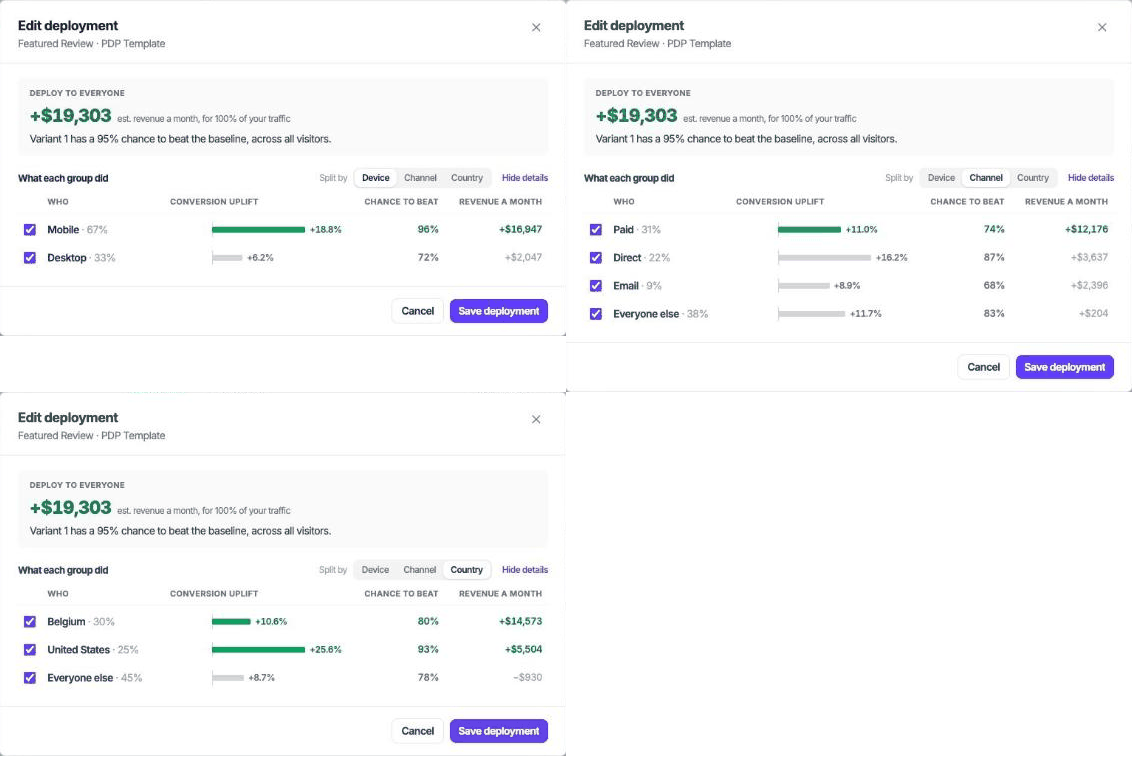
| Option | What it does |
|---|---|
| Smart deploy (recommended) | Dalton proposes the audience based on the results |
| Everyone | The change goes live for every visitor of the page |
| Custom | Click Narrow the audience and tick the groups yourself |
Segments
| Axis | Groups |
|---|---|
| Device | Mobile; desktop (tablets included) |
| Channel | Paid, direct, email, AI assistants, everyone else |
| Country | Your top 5 countries, everyone else |
Country is only offered on tests where every session has a country, which is the case for newer experiments. An axis the test already targeted is not offered again.
How Smart deploy decides
Smart deploy looks at one axis at a time.
- The variant won. It goes live for everyone, except a group that makes up 30% or more of the traffic and where the variant clearly lost.
- The variant did not win. It goes live only for the groups where it clearly won, if together they make up 30% or more of the traffic.
The test's targeting carries over
A deployment keeps the test's own audience. A test that only ran for utm_campaign is spring-sale deploys only for that campaign. Any segment you pick is added on top.
For what isn't possible yet, see What You Can Build.